HTML Tables; JS Constructor Functions
Tables in html
The HTML table model allows authors to arrange data – text, preformatted text, images, links, forms, form fields, other tables, etc. – into rows and columns of cells.
Each table may have an associated caption that provides a short description of the table’s purpose. A longer description may also be provided for the benefit of people using speech or Braille-based user agents.
The HTML tables are created using the <table> tag in which the <tr> tag is used to create table rows and <td> tag is used to create data cells. The elements under <td> are regular and left aligned by default.

Table Heading
Table heading can be defined using <th> tag. This tag will be put to replace <td> tag, which is used to represent actual data cell. Normally you will put your top row as table heading as shown below, otherwise you can use <th> element in any row. Headings, which are defined in <th> tag are centered and bold by default.
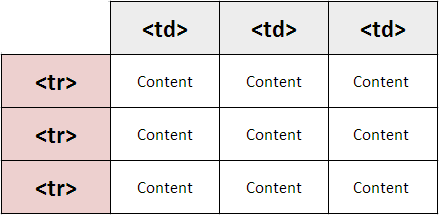
Cellpadding and Cellspacing Attributes
There are two attributes called cellpadding and cellspacing which you will use to adjust the white space in your table cells. The cellspacing attribute defines space between table cells, while cellpadding represents the distance between cell borders and the content within a cell.
Tables Backgrounds
You can set table background using one of the following two ways :
- bgcolor attribute − You can set background color for whole table or just for one cell.
- background attribute − You can set background image for whole table or just for one cell.
You can also set border color also using bordercolor attribute.